How We Use DashThis in Our Agency Workflows (And Why It Became Our Standard Reporting Solution)

Reporting is one of those things every marketing agency has to do, but almost nobody actually enjoys.
It is repetitive, takes time, and if you are not careful, it quickly turns into a process that eats up hours every month. At the same time, it is incredibly important. Clients rely on it to understand performance, and if the reporting is messy or unclear, it creates unnecessary back and forth.
At our Google Ads agency, we manage more than 140 clients in Google Ads and Microsoft Ads. So reporting is not something we deal with occasionally. It is part of our everyday work.
Over time, we tested different tools and setups. Eventually, we landed on DashThis and made it our standard reporting solution. In this article, we want to share how we actually use it in our workflows and what changed for us after the switch.
Why Reporting Was a Bottleneck in Our Agency
The real issue was never the data itself, but how much effort it took to turn it into usable reports.
Before DashThis, we worked a lot with Google Looker Studio. And to be fair, it is a powerful tool. But in our day-to-day work, it caused quite a few problems:
- Reports broke from time to time
- Setting things up or making changes took longer than expected
- It required a certain technical understanding
- Small tweaks sometimes led to unexpected issues
In practice, this meant that building or adjusting a report could easily take one to two hours. That might not sound dramatic at first, but when you multiply that across many clients, it becomes a real problem.
More importantly, it pulled our team away from actual performance work. Instead of optimizing campaigns, we were fixing reports.
How We Use DashThis in Our Daily Workflows
Try this template with your data
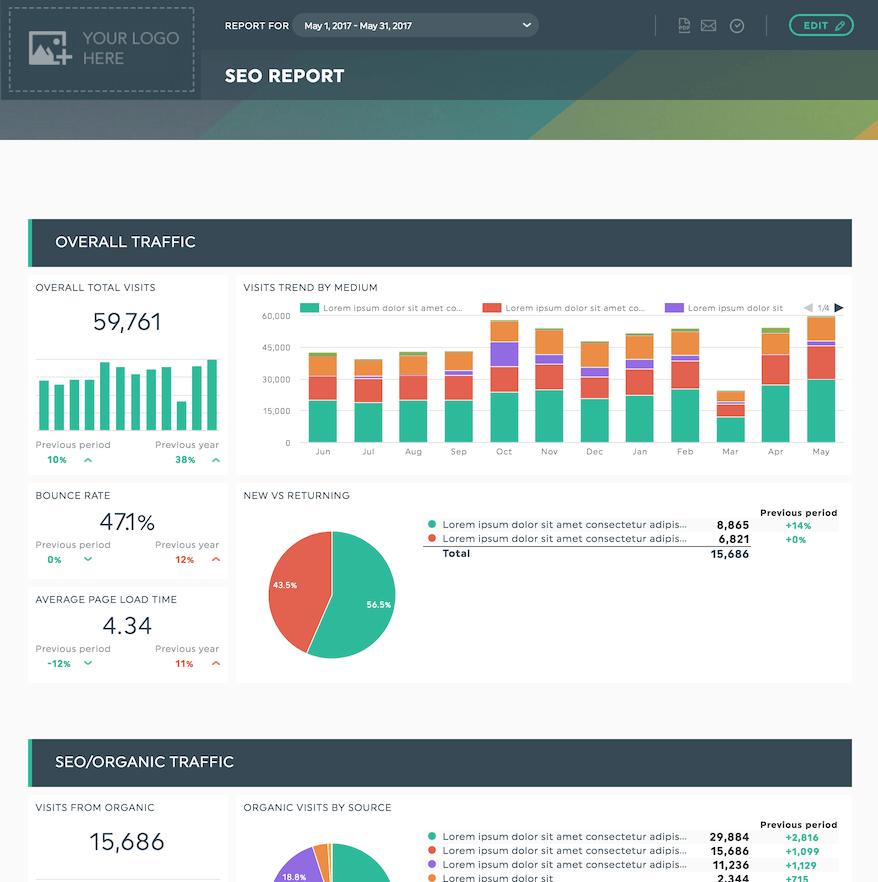
What changed with DashThis is that reporting became something you just do quickly, instead of something you have to “plan time for”.
Today, most of our clients receive their reports via DashThis. Here is how we typically use it.
1. Monthly Client Reporting
We build automated monthly reports that combine data from:
- Google Ads
- Microsoft Ads
- Google Analytics
Depending on the client, the structure varies a bit:
- E-commerce clients get a more revenue-focused setup
- Lead gen clients focus more on conversions and CPL
- Some clients mainly care about visibility and traffic
Once a template is set up, we can reuse it and adjust it in a few minutes. That alone saved us a lot of time.
2. Live Dashboards via Shareable Links
One feature we ended up using a lot is the live dashboard via link.
Instead of sending static reports back and forth, clients can just access their dashboard whenever they want.
What we noticed:
- Clients check their numbers more regularly
- There is less need to send updated versions
- Conversations become more focused because everyone sees the same data
It also reduces small requests like “can you send me the latest numbers again?” because they already have access.
3. Internal Performance Reviews
We also use DashThis internally more than we initially expected.
When preparing for calls or reviewing accounts, it helps to have a clean dashboard instead of jumping between different tools.
It makes it easier to:
- Get a quick overview of performance
- Spot trends or issues
- Prepare for client conversations
The Key Advantages We Observed
For us, the biggest win was simply that reporting stopped being a time-consuming task.
Here are the main things that stood out after switching.
1. Less Time Spent on Reporting
Before: 1 to 2 hours for setup or bigger changes
Now: Usually just a few minutes
Across many clients, that is a big difference.
2. Easier for the Whole Team
Not everyone on the team wants to deal with complex reporting setups. And honestly, they shouldn’t have to.
DashThis is simple enough that every account manager can work with it:
- Adjust widgets
- Change layouts
- Duplicate dashboards
No need for someone “technical” to step in.
3. More Reliable Setup
One thing that used to be frustrating was instability.
DashThis is much more consistent. Once a dashboard is set up, it just works. That alone removes a lot of small annoyances in daily work.
4. Better Client Communication
Clear reporting makes client communication easier, that is pretty straightforward.
With DashThis:
- Clients understand what they are looking at
- There are fewer follow-up questions
- Changes can be made quickly if needed
It just makes the whole process smoother.
5. Works Well as You Scale
As the number of clients grows, reporting can become chaotic if there is no structure.
With templates and a consistent setup, DashThis helped us keep things organized without adding complexity.
Example Dashboard Setup
Try this template with your data
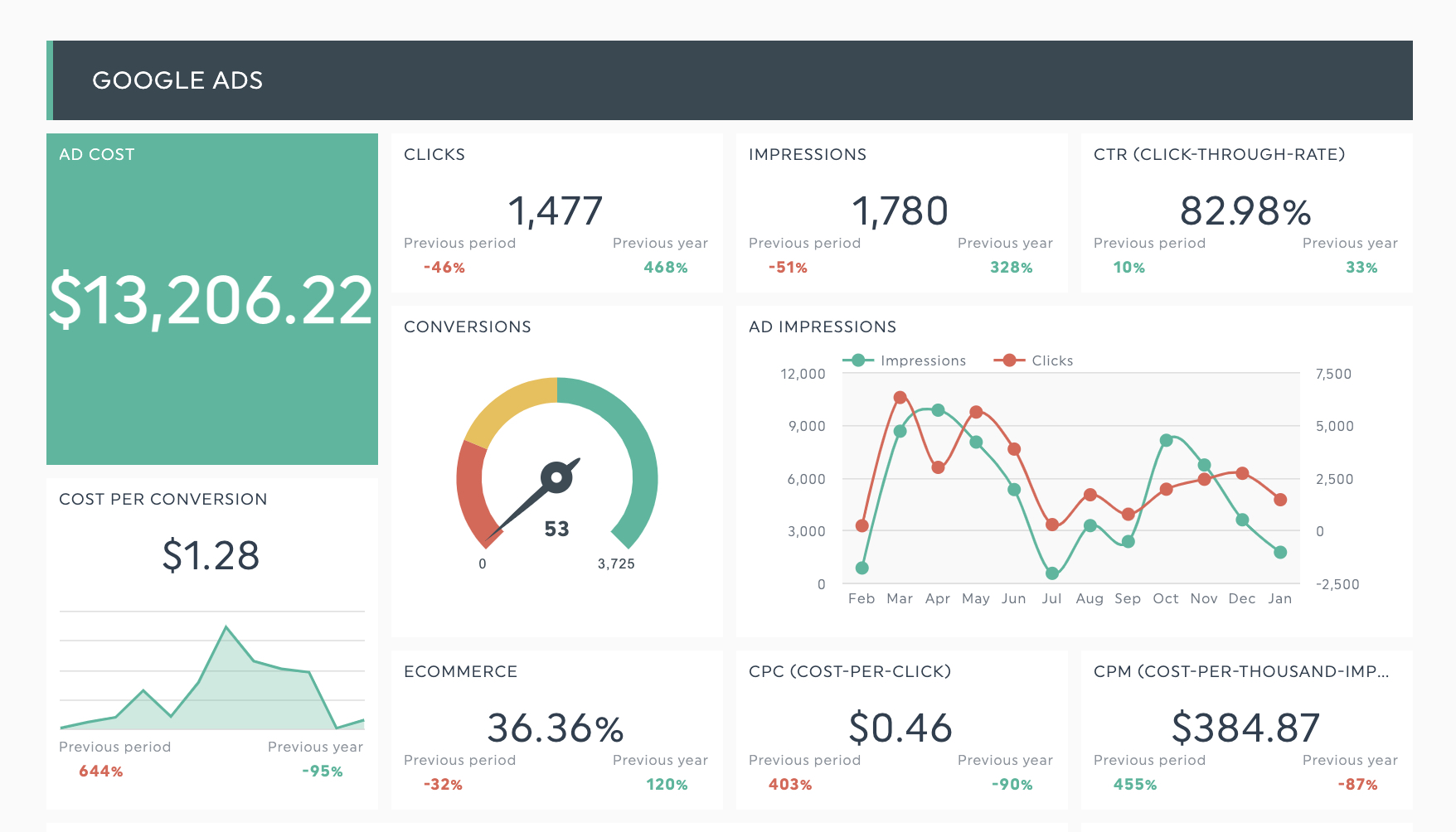
A typical dashboard for us includes:
- Campaign performance overview
- Cost per conversion
- Conversion volume
- Top campaigns and keywords
- Performance trends
How to Approach Reporting as a Marketing Agency
From our experience, the tool itself is less important than how well it fits your workflow.
If you are evaluating reporting solutions, these are the things that matter most:
- Ease of use: Can your whole team work with it without friction?
- Reliability: Does it work consistently without breaking?
- Flexibility: Can you adapt reports quickly for different clients?
- Automation: Does it reduce manual work instead of creating more?
- Accessibility: Can clients easily understand and access the data?
For us, DashThis checked these boxes better than the tools we used before, which is why we stuck with it.
- If you want to get a better idea of how dashboards look, you can take a look here:
https://dashthis.com/google-ads-report/ - And more generally about reporting tools:
https://dashthis.com/marketing-reporting-software/
Final Thoughts
Reporting should support your work, not slow you down.
For us, switching to DashThis was less about getting more features and more about simplifying a process that had become unnecessarily complicated.
It helped us save time, reduce friction in the team, and make reporting easier for clients to understand.
If you are currently rethinking your reporting setup, it is definitely worth testing a few tools and seeing what actually works in your day-to-day operations. In our case, DashThis turned out to be the most practical solution.

Ready to automate your reporting?
Read More
Don’t miss out!
Follow us on social media to stay tuned!


Automate your reports!
Bring all your marketing data into one automated report.
Try dashthis for free